
Earmark
AI Voice Notes
Record. Mark.
Remember.
The voice recorder that knows what mattered.
Record a lecture, meeting or idea. When something important is said, tap Mark. When you stop, Earmark turns the recording into clean notes — with your marked moments on top, a summary, and every action item. Everything happens on your iPhone.
Free to download. No account required. SemeLabs never sees your data.
On-device
Recording, notes and AI
No account
Open and start recording
Your data
SemeLabs never sees it
Mark the moment
Tap Mark when something matters.
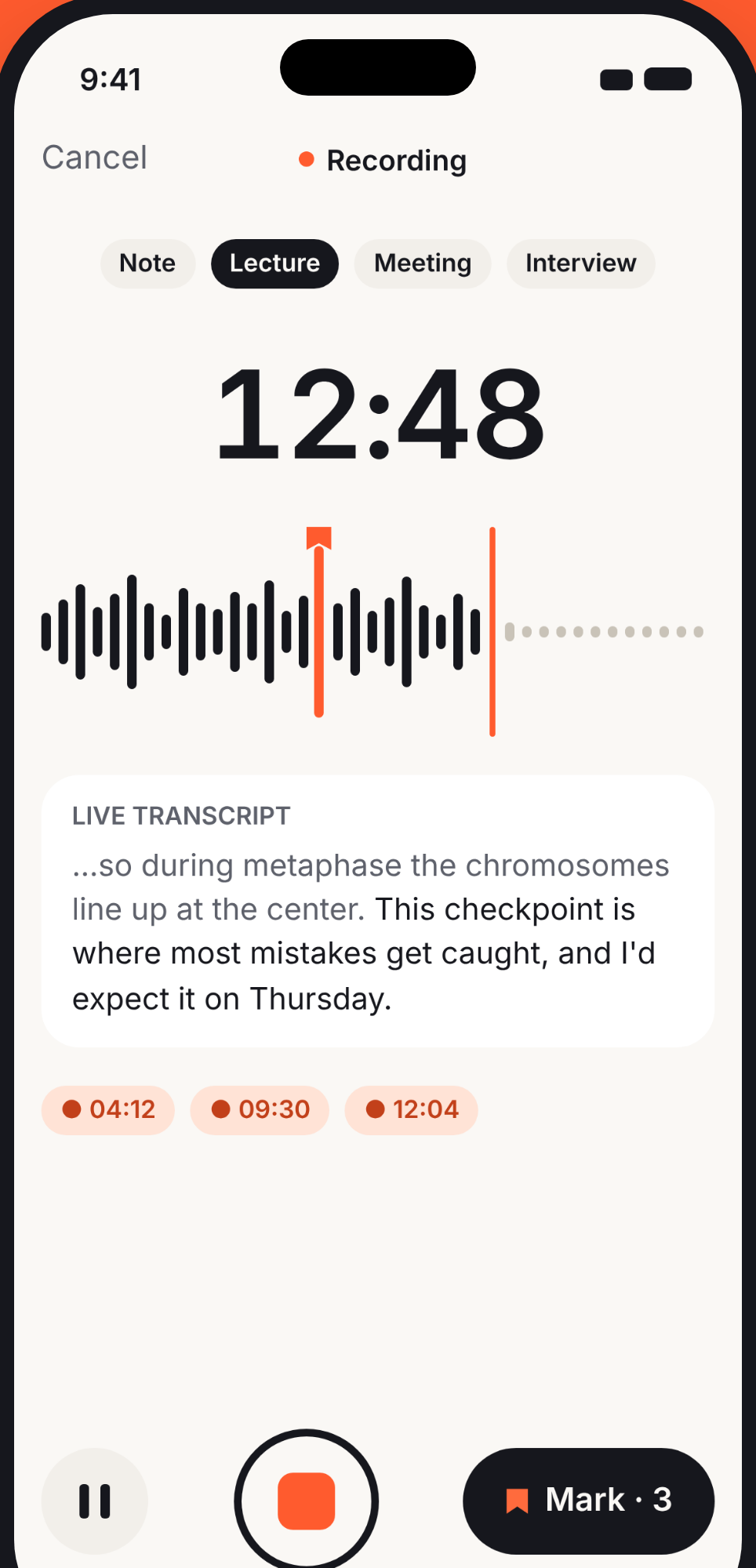
While recording, a single tap drops an orange marker on the waveform at that exact second. Mark from the app, the Lock Screen, or your Live Activity — without breaking your flow.
- Choose a category before you start: Note, Lecture, Meeting or Interview. Earmark tailors its AI output to each type.
- Live transcript scrolls as you speak, so you can see what is being captured in real time.
- Mark as many moments as you want. Each one is timestamped and appears as a chip at the bottom of the screen.
- Pause and resume without losing your marks. Recording time and waveform pick up exactly where you left off.
Highlights first
The moments that mattered, on top.
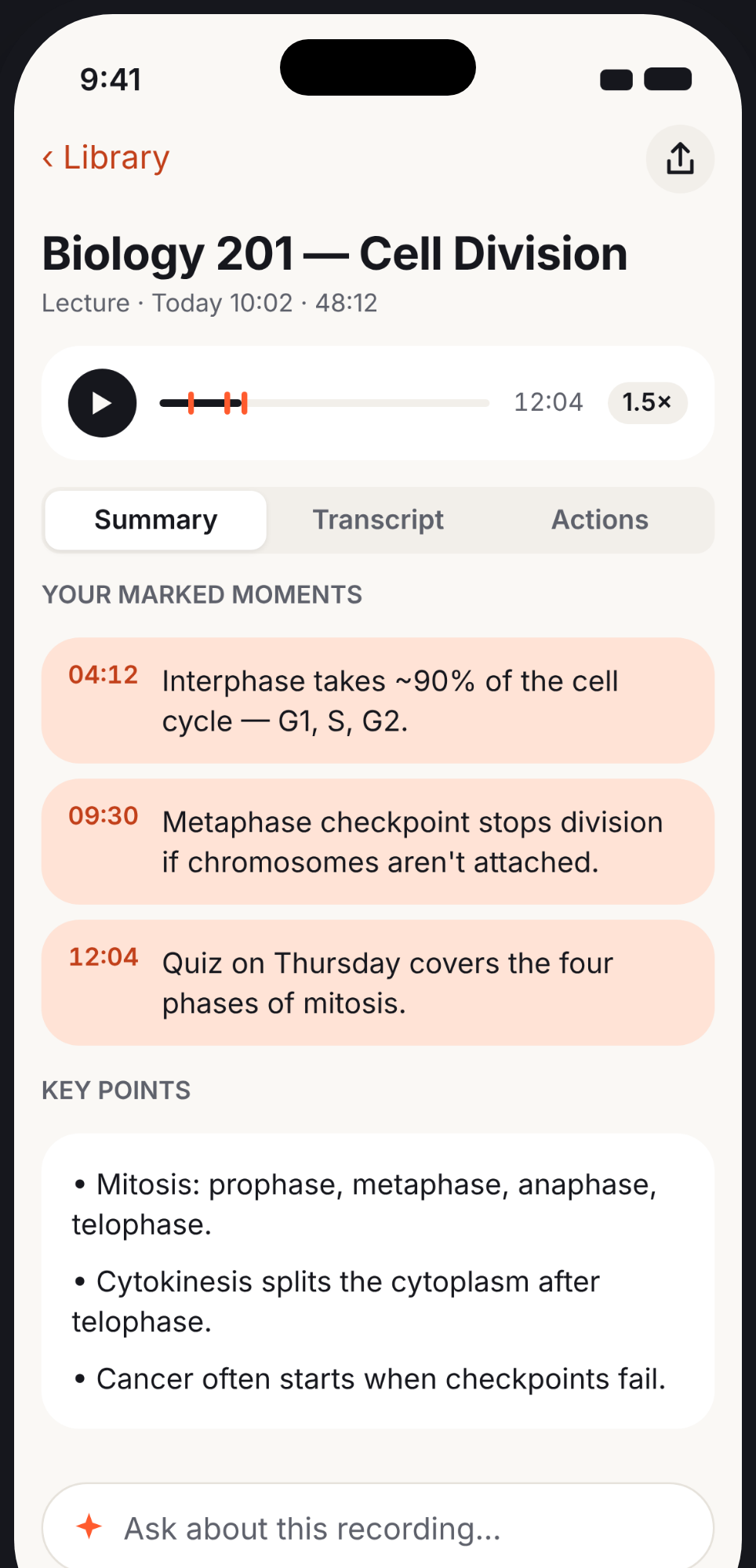
Stop recording and Earmark builds your notes. Your marked moments are highlighted at the top of the summary, each with a one-line description and a timestamp you can tap to jump to that exact point in the audio.
- Marked moments are summarized into short, scannable highlights — no need to re-listen.
- Key points are extracted automatically: the facts, figures and ideas worth remembering.
- Three tabs organize everything: Summary for the overview, Transcript for every word, and Actions for follow-ups.
- Ask Earmark anything about the recording from the input field at the bottom. Answers cite the exact timestamp.
Full transcript
Every word, searchable.
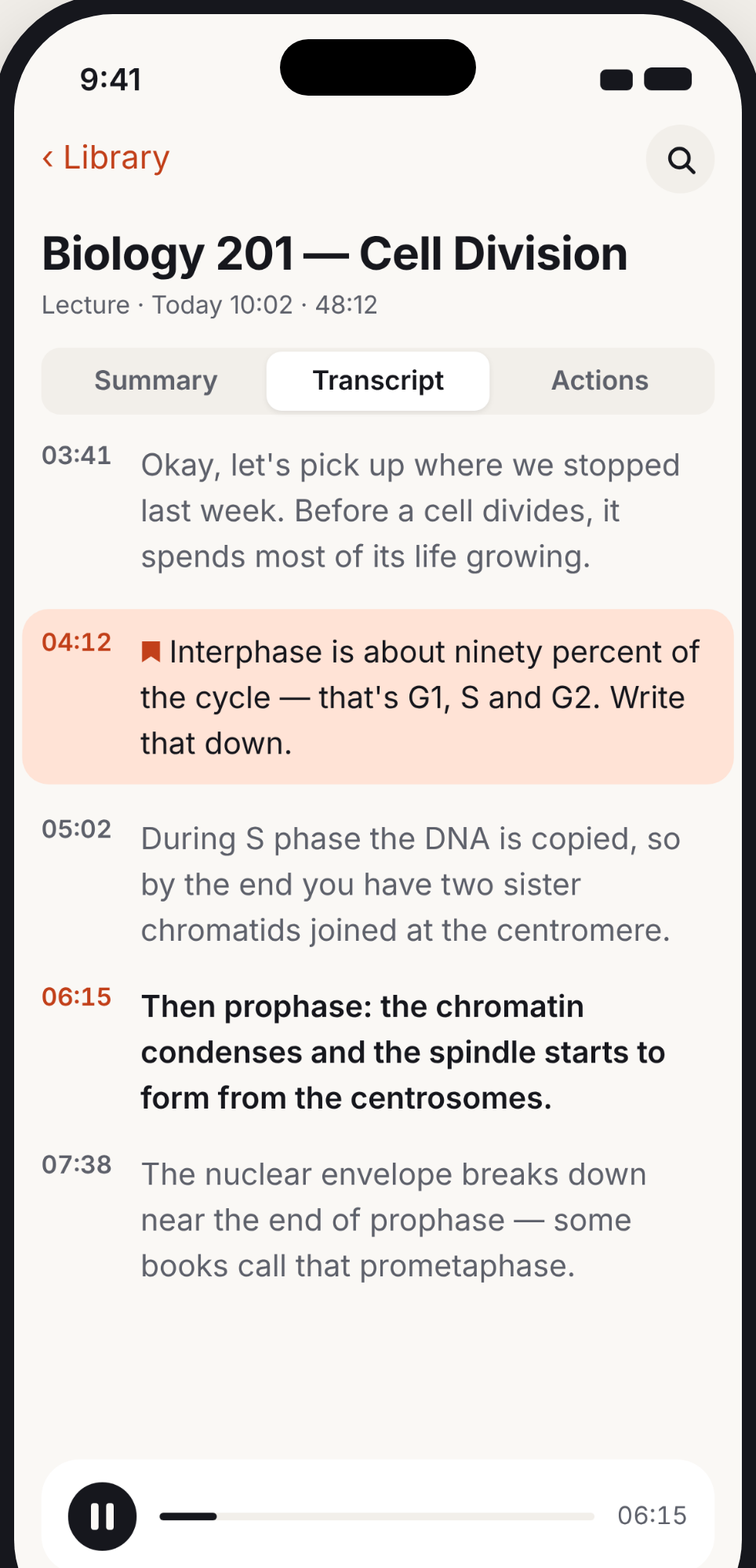
Earmark transcribes the entire recording on your device in about 60 languages, including Arabic, French and Spanish. The result is a timestamped, scrollable transcript where every line is tappable — tap a timestamp to jump to that moment in the playback.
- Marked moments are highlighted in the transcript so you can spot them at a glance, even in an hour-long recording.
- Search the transcript with the built-in search bar. Find any word or phrase across the full recording.
- Playback follows the transcript: the current line is highlighted as audio plays, so you always know where you are.
- Speed controls let you play back at 0.5x to 2x. Combined with tap-to-seek, you can review a 60-minute lecture in minutes.
Ask Earmark
Ask your recordings anything.
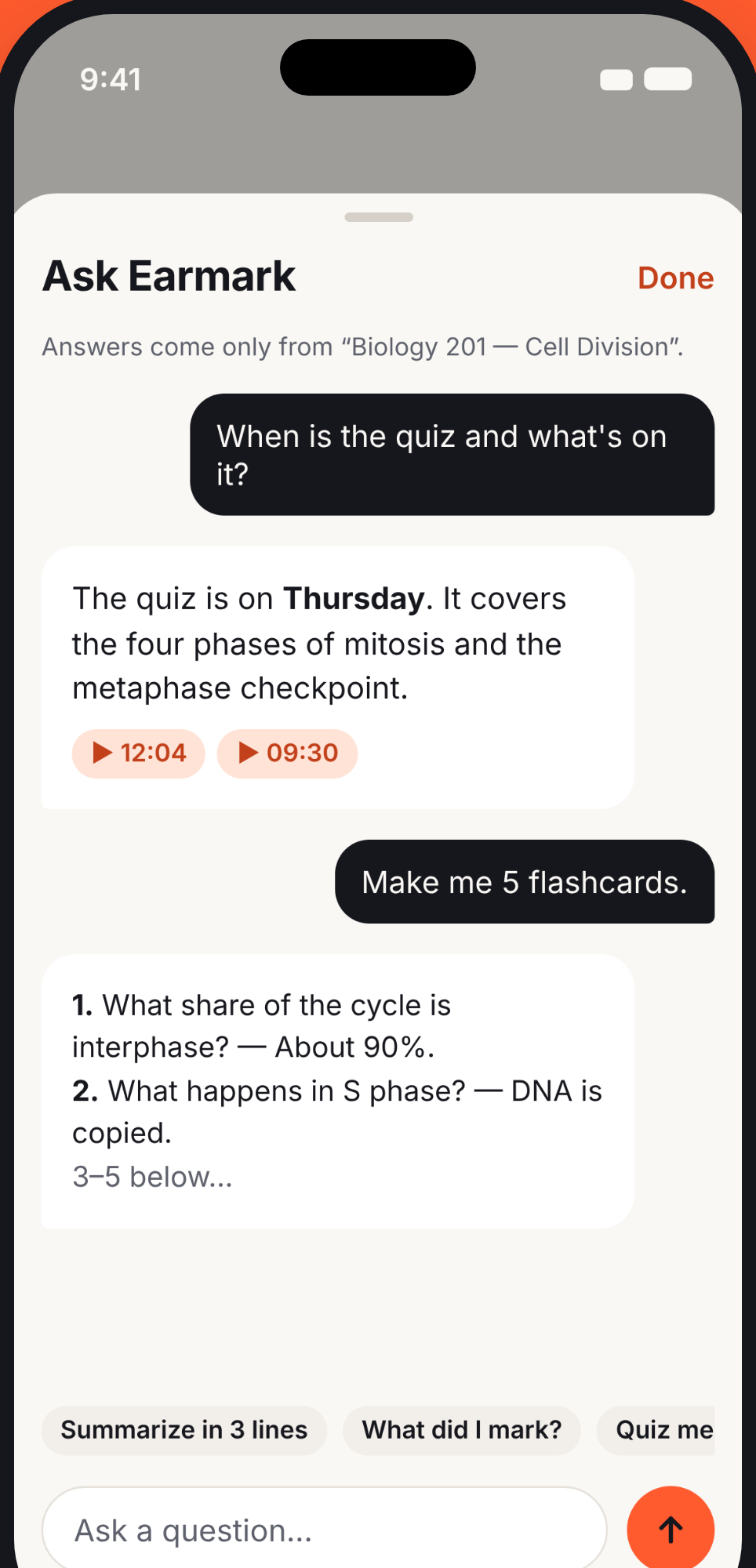
Have a question about something that was said? Type it in natural language and Earmark answers from the recording — with the exact timestamps linked, so you can verify the source in one tap.
- Answers are grounded in your recording. Earmark cites timestamps so you can jump to the original audio and confirm.
- Suggested prompts help you get started: Summarize in 3 lines, What did I mark?, Quiz me.
- Generate flashcards from any recording. Ask Earmark to make 5 flashcards and get Q&A pairs drawn from the content.
- Every answer stays on your device. Ask works on every supported iPhone, on-device.
Action items
Never miss a to-do.
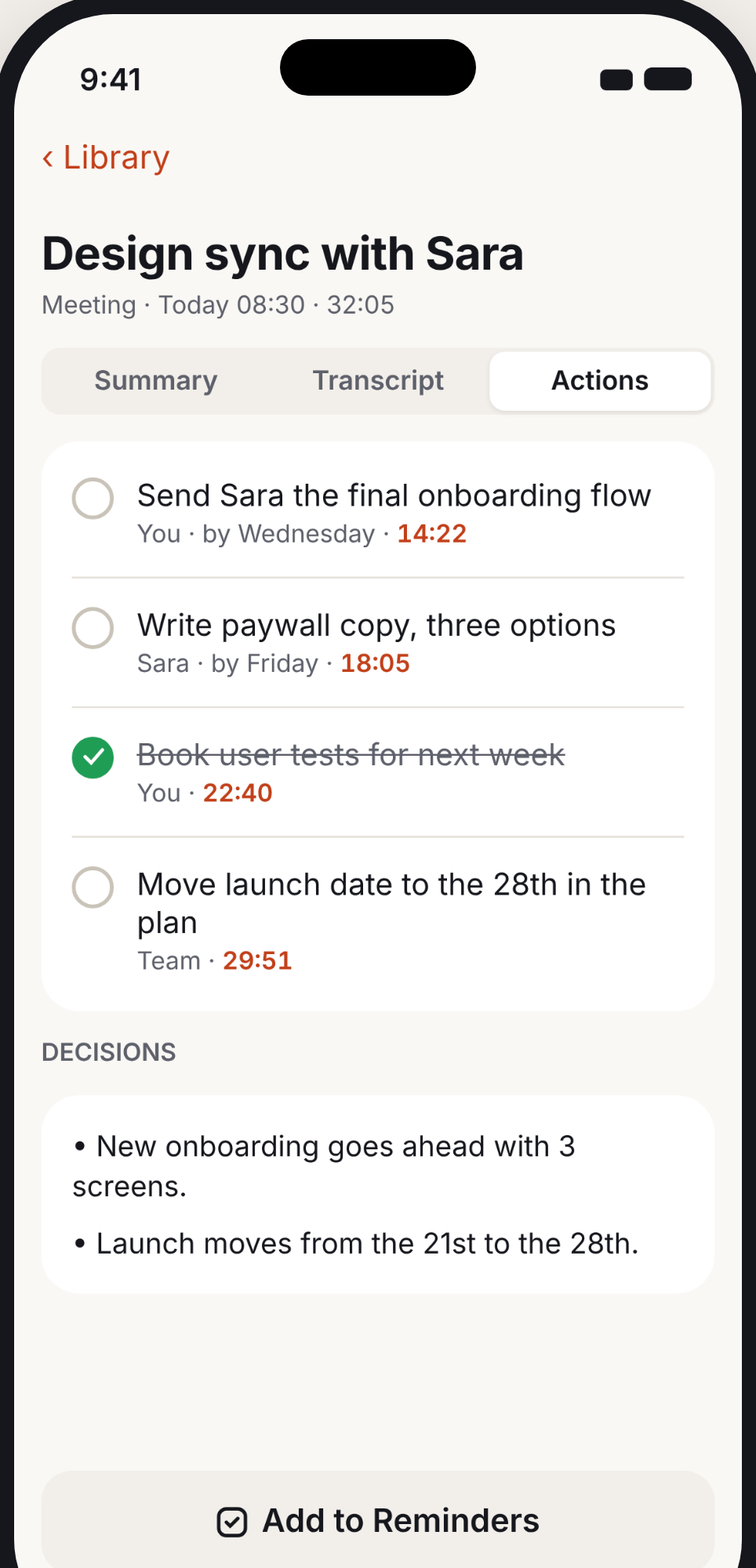
Earmark listens for decisions and action items during your recording. After processing, the Actions tab shows each one with who is responsible, the deadline mentioned, and the timestamp where it was discussed.
- Action items include the assignee and deadline when mentioned in the conversation — ready for your task manager.
- Decisions are listed separately at the bottom, so you have a clear record of what was agreed.
- One tap on 'Add to Reminders' sends your action items to the iOS Reminders app with the deadlines preserved.
- Check off items directly in Earmark as you complete them. Your progress is saved with the memo.
Private by design
Private. On your iPhone.
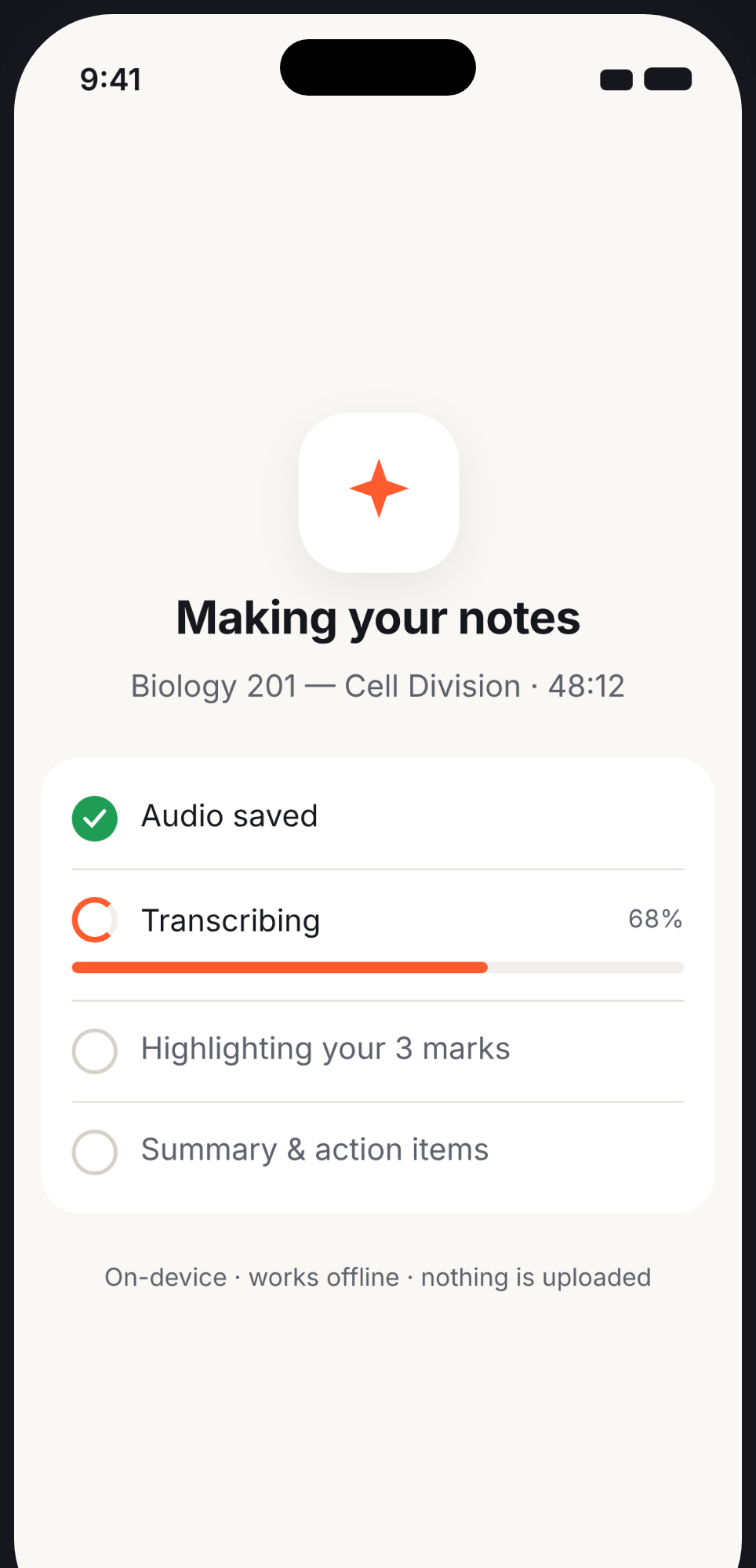
Your recordings, notes and AI stay on your iPhone. No account. SemeLabs never sees your data. The first time you use a new language, Apple's speech service may transcribe it while the on-device model downloads. You can turn this off in Settings.
- Audio is saved to your device. SemeLabs has no servers that receive your content.
- Transcription uses Apple's on-device speech recognition. If the on-device model for a language has not been downloaded yet, Apple's speech service transcribes it in the meantime.
- AI summaries, highlights and action items are generated on your device by Apple Intelligence or Earmark's on-device notes engine.
- Works offline for recording, playback, notes, Ask and export. Transcription works offline once the language's speech model is on your iPhone.
- App Store privacy label: Data Not Collected. Earmark has no analytics SDKs, no tracking, and no advertising.
Made for iPhone
Starts recording before you open the app.
Earmark is built as a native iPhone app from the ground up. It integrates with the features you already use, so recording is always one action away.
Control Center
Add Earmark to Control Center and start a recording without unlocking or finding the app.
Lock Screen
Start a recording and tap Mark directly from the Lock Screen. Your phone can stay in your pocket.
Live Activity
A persistent Live Activity shows the recording timer and a Mark button on the Dynamic Island and Lock Screen.
Action Button
Map Earmark to the Action Button on iPhone 15 Pro and later. One press starts recording instantly.
Siri & Shortcuts
Use Siri to start a recording hands-free, or build Shortcuts workflows with Earmark actions.
Dark Mode
Full Dark Mode support with carefully tuned contrast ratios and colors that match the system appearance.
Accessibility
Dynamic Type, VoiceOver, and Reduce Motion are supported throughout the entire app.
Languages
Transcripts in about 60 languages. The app interface is in English, Arabic, French, Spanish, German, Portuguese and Italian.
Built for
Anyone who listens and needs to remember.
Students
Lectures, study sessions, office hours, group projects. Mark the key concepts as your professor says them, then review the highlights before the exam instead of re-listening to 90 minutes of audio.
- Lecture recordings with summaries and key points
- Flashcard and quiz generation from any recording
- Searchable transcripts for exam review
- Office hours notes with action items
Professionals
Meetings, 1:1s, client calls, interviews, brainstorms. Earmark captures decisions and to-dos automatically, so you can stay present in the conversation instead of typing notes.
- Meeting notes with action items and deadlines
- Client call summaries sent to your team
- Interview recordings with marked highlights
- Decision logs you can search later
Thinkers
Ideas on a walk, voice journaling, brainstorming sessions, sermon notes, therapy reflections. Capture the thought as it comes and let Earmark organize it into writing you can use.
- Voice memos turned into clean paragraphs
- Walking brainstorms with marked key ideas
- Journal entries with extracted themes
- Sermon or talk notes with key points
Pricing
Start for free. Upgrade when you need more.
Earmark is free to use with unlimited recordings and Mark. Upgrade to Pro to unlock summaries, highlights, action items and unlimited transcripts.
Free
$0
Everything you need to start recording and marking moments.
- Unlimited recordings
- Mark moments while recording
- Live transcript during recording
- Transcripts up to 10 minutes
- Audio playback with speed controls
- Search across all recordings
- Import from Voice Memos and other apps
- Lock Screen, Control Center and Live Activity
- No account or sign-up required
Earmark Pro
$34.99
/year
3-day free trial included
Also available weekly at $4.99/week.
Cancel anytime in Settings. No questions asked.
- Everything in Free
- Highlights from your marked moments
- Summaries and key points
- Action items with deadlines and assignees
- Decisions extracted automatically
- Ask Earmark: chat with any recording
- Create study notes, minutes, emails, flashcards and quizzes
- Translate notes on your iPhone
- Unlimited transcripts (any length)
- Add action items to Reminders
- PDF and text export
Payment is charged to your Apple Account at confirmation of purchase. Subscriptions renew automatically unless cancelled at least 24 hours before the end of the current period.
System requirements
iOS 18+
Required for all features. Recording and transcription work on any iPhone running iOS 18.
Apple Intelligence
AI-written summaries, quizzes and flashcards require iOS 26 or later with Apple Intelligence turned on. On other iPhones, notes are picked from your transcript.
Works offline
Recording, playback, notes, Ask and export work without internet. Transcription works offline once the language's speech model is on your iPhone.
FAQ
Frequently asked questions
Is my audio uploaded?
Not to us, ever. Earmark has no servers. If a language's on-device speech model is not downloaded yet, Apple's speech service transcribes that recording (you can turn this off in Settings). Everything else, including AI notes, happens on your iPhone.
Which iPhones does Earmark support?
Earmark requires iOS 18 or later. Recording and transcription work on any iPhone running iOS 18. Summaries, key points, action items and Ask Earmark work on every supported iPhone. AI-written summaries, quizzes and flashcards require iOS 26 or later with Apple Intelligence turned on. On other iPhones, notes are picked from your transcript.
Does it work offline?
Yes, for recording, playback, notes, Ask and export. Transcription works offline once the language's speech model is on your iPhone; iOS downloads it once.
How long can a recording be?
There is no time limit on recordings. Free users get transcripts for recordings up to 10 minutes. Earmark Pro removes that limit — transcribe recordings of any length.
How accurate is the transcription?
Earmark uses Apple's on-device speech recognition, which is highly accurate for clear audio in supported languages. Accuracy depends on audio quality, background noise, and accents. For important content, you can always tap a timestamp to jump back to the original audio.
Can I import existing recordings?
Yes. Use the Share button in Voice Memos, Files, or any other app and choose Earmark. You can also tap the + button in the Library to import an audio file.
Can I export my notes?
Yes. With Earmark Pro, you can export any memo as a PDF or text that includes the summary, transcript, action items and decisions. You can also share individual sections using the system share sheet.
How does Ask Earmark work?
Ask Earmark lets you type a question in natural language about any recording. It reads the transcript and answers your question, citing the exact timestamps where the answer came from. You can also use suggested prompts like 'Quiz me' or 'Summarize in 3 lines'. Ask works on every supported iPhone.
What happens to my data if I delete the app?
All recordings, transcripts and settings are removed from your device when you delete the app. If you enabled iCloud backup for Earmark, that data remains in your iCloud account until you clear it in Settings.
How do I cancel my subscription?
Go to Settings on your iPhone, tap your Apple Account, then Subscriptions. Find Earmark Pro and tap Cancel Subscription. You will keep access until the end of your current billing period.
Is it legal to record conversations?
Laws vary by location. Some jurisdictions require consent from all parties being recorded. You are responsible for following the laws where you record. Earmark does not monitor or restrict how you use the app.
Record. Mark. Remember.
Download Earmark and never lose an important moment again. Free to start, no account required. SemeLabs never sees your data.
Download on theApp Store